Cases.gg Promo Code on Mobile: Is There an App?
 Written by Aiden Park · · Fact-checked October 2026 · How we review

More and more people try mystery box sites on their phones first, so it's no surprise that "Cases.gg app" and "Cases.gg promo code mobile" are common searches. The short version: you don't need an app. Cases.gg runs in your phone's browser, and everything, including the free welcome cases, codes and purchases, works there.
This guide explains what independent reviews say about apps, how to claim the welcome offer and use codes on a phone, how to make Cases.gg feel like an app, and why you should avoid anything that offers a downloadable "Cases.gg app".
Is there a Cases.gg mobile app?
As of October 2026, independent reviews including Lines.com and WSN describe Cases.gg as browser-based, with no official iOS or Android app. The site is designed to work on phone screens, so the mobile experience is the same site with a layout that adapts to a smaller screen.
That's common for sweepstakes and mystery box sites. App store rules around games of chance with real-world prizes are strict, so many operators skip native apps and invest in their mobile website instead.
What about sites offering a Cases.gg app?
We've seen unofficial pages using the Cases.gg name that advertise an app download. We can't confirm they have anything to do with Cases.gg, and you shouldn't need them. Our advice:
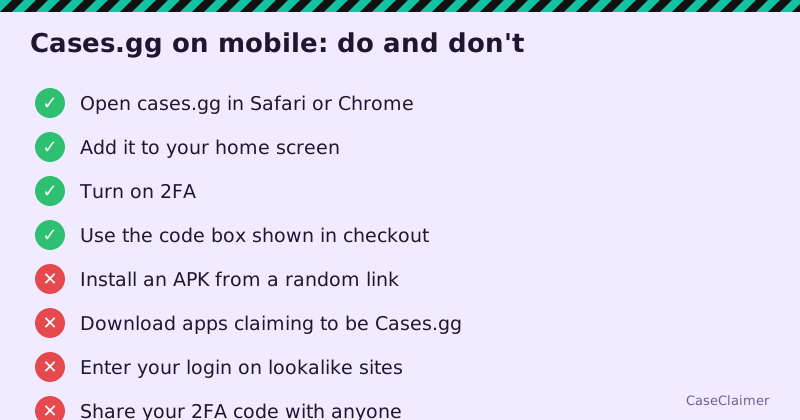
- Don't install APK files from links in comments, DMs or unofficial sites.
- Don't enter your Cases.gg login in any app that didn't come from Cases.gg itself.
- If Cases.gg ever launches an official app, it will be announced on cases.gg and its official social accounts. Go there, not to a search result.
How to claim the free welcome cases on your phone
- Open the sign-up page in Safari, Chrome or your usual mobile browser. Our button above takes you straight there.
- Create your account with your email, a strong password and accurate details. Use your real name and address, because you'll need them to match your ID later.
- Confirm your email if asked.
- Open the menu and go to the free cases area.
- Claim the 3 welcome cases. They open the same way they do on desktop.
If they don't show up, the usual causes are an account that already used the offer, an email not yet confirmed, or an ineligible location. Our free cases not showing guide walks through each.
Using a promo code on mobile
There's no special mobile-only code. Codes work the same way in a phone browser as they do on a computer:
- At sign-up, if the form shows a referral or code field.
- At checkout, if a bonus code box appears when buying Gold Coins.
Two things are worth remembering:
- You don't need a code from us. Joining through our link opens the normal sign-up flow, and the welcome cases come with it.
- Only one referrer sticks to an account. Typing a second creator's code later usually won't replace the first. See our affiliate code vs promo code guide for why.
For how purchase bonuses and their conditions work, see the deposit bonus explainer.
Make Cases.gg feel like an app
You can add the site to your home screen so it opens with one tap, like an app.
iPhone and iPad (Safari)
- Open cases.gg in Safari.
- Tap the Share button.
- Scroll and tap Add to Home Screen.
- Name it and tap Add.
Android (Chrome)
- Open cases.gg in Chrome.
- Tap the three-dot menu.
- Tap Add to Home screen or Install app, depending on your version.
- Confirm.
The icon opens the real website, so you get updates automatically and nothing extra is installed. It also protects you from typing a lookalike address by mistake.
Mobile vs desktop: what's different?
| Feature | Mobile browser | Desktop |
|---|---|---|
| Sign-up and welcome cases | Yes | Yes |
| Promo or referral codes | Yes | Yes |
| Buying Gold Coins | Yes | Yes |
| Apple Pay / Google Pay | Easier on the matching phone | Depends on browser |
| Case openings and battles | Yes, smaller layout | Yes, more room |
| Odds tables | Yes, may need scrolling | Easier to read |
| ID verification uploads | Easy with phone camera | Needs scanned files |
The biggest practical advantage of a phone is verification: you can photograph your ID and proof of address directly. Our ID verification guide covers what's needed.
The biggest disadvantage is that odds tables are harder to read on a small screen. Before opening any box, scroll through the full table, or check it on a larger screen first. Our odds and house edge guide explains what the numbers mean.
Paying on mobile
Cases.gg lists cards and digital wallets alongside crypto for Gold Coin purchases. On a phone, Apple Pay or Google Pay can be the quickest option where offered. Our card, Apple Pay and Google Pay guide covers fees and limits.
Two mobile-specific cautions:
- One-tap payments make it easy to overspend. Set a budget before you start and consider turning off saved payment methods.
- Don't buy on public Wi-Fi without a trusted connection. Use mobile data or a secure network.
Keep your account safe on a phone
Phones get lost, borrowed and shared, so account security matters more:
- Turn on two-factor authentication. Our 2FA guide shows how.
- Lock your phone with a PIN or biometrics.
- Don't save your password in a browser on a shared device.
- Ignore DMs offering mobile bonuses, app downloads or "verification" links.
Troubleshooting Cases.gg on mobile
Most mobile problems come down to the browser rather than the site. If something isn't working, try these in order.
The page won't load or keeps spinning. Switch between Wi-Fi and mobile data, then reload. If it still fails, close the tab completely and open a fresh one.
The welcome cases or bonus don't appear. Log out and back in, and make sure your email is confirmed. Then check you haven't already claimed the offer on another device; the offer is per account, not per device.
You can't log in after adding it to the home screen. Home screen shortcuts on some phones keep their own storage, separate from the main browser. Log in once inside the shortcut and it should remember you.
A code box is missing. Code fields don't always show on every screen. Rotate to landscape or scroll the whole form; some fields appear only at the purchase step.
Animations stutter during openings. Close other tabs and apps, turn off battery saver mode, and update your browser. Older phones can struggle with heavy animation, but results are decided by the server, not your phone, so a stutter doesn't change the outcome.
Uploads for verification fail. Take the photo in good light, make sure all four corners of the document are visible, and avoid HEIC or very large files if the upload rejects them; a screenshot of the photo is often a smaller, accepted format.
If none of that helps, contact Cases.gg support from the email address on your account and say which phone and browser you're using.
Which browser works best?
Any up-to-date mainstream browser should work. Safari on iPhone and Chrome on Android are the most tested. Privacy browsers and aggressive ad blockers can sometimes interfere with sign-up forms or payment pop-ups, so if something breaks, try the phone's default browser before assuming the site is down.
It also helps to keep one browser for Cases.gg rather than switching between several. Your login, saved settings and any referral tag from the link you joined through live in that browser's storage, so jumping between apps can make it look as if an offer or setting has disappeared when it's simply stored somewhere else on the phone.
Who can play on mobile?
The same rules apply on any device. You must be 18+ and located in an eligible US state; Cases.gg isn't available in Idaho, Michigan, Montana, Nevada or Washington. Using a VPN on your phone to get around that breaks the terms and can void winnings. Physical prizes ship only to North America and EU countries, with shipping charges paid by you; see our restricted states guide.
Our take
You don't need a Cases.gg app, and you shouldn't trust one that appears outside the official site. The mobile website does everything: sign-up, the 3 free welcome cases, codes, purchases and verification. Add it to your home screen, turn on 2FA, read the odds tables carefully, and keep a budget, because one-tap payments make spending easier than it should be.